How To …
WiFi to Ethernet router
by Mostafa on Aug.09, 2018, under How To ..., Linux, Software
A WiFi to Ethernet router is handy when you need to connect a wired device to a network/Internet but only have access to a wireless network. While certainly not a common scenario, the requirement does arise from time to time. The steps involved are actualy almost the same as setting up a NAT router but using the wireless interface as the WAN port rather than Ethernet. The iptables and dhcp (server) packages the needed for this to work. Although the following instructions are for a CentOS/RHEL 6.X type system, the same principles will apply to other distributions as well.
Configure the DHCP server
The DHCP server provides IP configuration information to any client(s) connecting over the Ethernet interface. Assuming the Ethernet interface is eth0, modify ‘/etc/sysconfig/dhcpd’ and set
DHCPDARGS=eth0
Next, modify ‘/etc/dhcp/dhcpd.conf’ to define the LAN-side subnet and options such as the router address and nameservers:
authoritative;

subnet 192.168.101.0 netmask 255.255.255.0 {
  range 192.168.101.2 192.168.101.10;
  option domain-name-servers 8.8.8.8;
  option domain-name "example.local";
  option routers 192.168.101.1;
  option broadcast-address 192.168.101.255;
  default-lease-time 3600;
  max-lease-time 7200;
}
Here we’ve selected Google DNS as the nameserver and defined a subnet that will provide addresses in the 192.168.101.2 to 192.168.101.10 range. At this point, the DHCP server is configured.
Before the server can be started, we need to ensure the eth0 has an address in the subnet defined. The address of 192.168.101.1 is assigned as it will act as the gateway router for any client(s) connected to the LAN:
[root@hostname ~]# ifconfig eth0 192.168.101.1 up
Ensure that the eth0 interface is static rather than automatic/DHCP configured to prevent the assigned address being overridden. Once the address has been assigned and the interface marked as up, the DHCP service can be started by running:
[root@hostname ~]# service dhcpd start
Configure the NAT router
Start by disabling (flushing) the firewall rules to keep things straightforward:
[root@hostname ~]# iptables --flush
Then enable forwarding and routing between wlan0 (Wireless) and eth0 (Ethernet) as follows:
[root@hostname ~]# echo 1 > /proc/sys/net/ipv4/ip_forward
[root@hostname ~]# iptables -t nat -A POSTROUTING -o wlan0 -j MASQUERADE
[root@hostname ~]# iptables -A FORWARD -i eth0 -j ACCEPT
That’s it! As long as the WiFi interface is configured and connected to a network, clients connected over the Ethernet port will not also have access to that network/Internet.
To disable the router, DHCP server, and reload the original firewall rules, simply run:
[root@hostname ~]# service iptables restart
[root@hostname ~]# echo 0 > /proc/sys/net/ipv4/ip_forward
[root@hostname ~]# service dhcpd stop
Linux Power Management
by Mostafa on Feb.13, 2014, under How To ..., Linux, Software
Just came across TLP – Linux Advanced Power Management which looks quite interesting. Not least because it contains built-in support for tpacpi-bat which I have discussed previously as a solution for setting the battery charge thresholds on my ThinkPad E530.
Pre-built binary packages are provided via a Yum repository system which is also a nice touch — making this a very easy solution to get set up with. The default configuration file saved in /etc/defaults/tlp looks sensible, although I did have to uncomment the battery charge thresholds.
ThinkPad E530 Fingerprint Reader on Linux
by Mostafa on Oct.10, 2013, under Hardware, How To ..., Linux
The E530 comes with a fingerprint reader but getting it working takes some amount of effort — at least on Fedora systems. The only project supporting this particular reader (147e:1002 Upek Biometric Touchchip/Touchstrip Fingerprint Sensor) seems to be Fingerprint GUI.
The first step is getting it to compile. The README for fingerprint-gui-1.05 suggests running:
$ qmake-qt4
$ make
but the build fails on Fedora 19 (x86_64) with these instructions. It is necessary to call qmake-qt4 with a couple of extra defines after cleaning up the previous failed attempt:
$ ./remove-makefiles.sh && ./remove-binaries.sh
$ qmake-qt4 LIBPOLKIT_QT=LIBPOLKIT_QT_1_1 LIB=lib64
$ make
at this point, assuming all of the required devel packages are installed, the build should complete successfully. Install by running:
$ sudo make install
$ sudo make install-upek
The user should also be added to the plugdev group if not already a member. Once installed, nothing much will happen until PAM is configured. In the meanwhile, it should be possible to run ‘fingerprint-gui’ to confirm that the reader is detected and enrol a few fingerprints.
The next step is to modify the PAM stack. Start by creating a backup of ‘/etc/pam.d‘ in case something goes wrong. Then, add the line auth sufficient pam_fingerprint-gui.so -d try_first_identified to a few of the core configuration files:
# diff -uN /root/pam.d /etc/pam.d
diff -uN /root/pam.d/fingerprint-auth /etc/pam.d/fingerprint-auth
--- /root/pam.d/fingerprint-auth	2013-07-12 09:13:16.000000000 +0100
+++ /etc/pam.d/fingerprint-auth	2013-10-09 23:36:29.052893499 +0100
@@ -2,7 +2,8 @@
 # This file is auto-generated.
 # User changes will be destroyed the next time authconfig is run.
 auth        required      pam_env.so
-auth        sufficient    pam_fprintd.so
+#auth        sufficient    pam_fprintd.so
+auth        sufficient    pam_fingerprint-gui.so -d try_first_identified
 auth        required      pam_deny.so

 account     required      pam_unix.so
diff -uN /root/pam.d/password-auth /etc/pam.d/password-auth
--- /root/pam.d/password-auth	2013-07-12 09:13:16.000000000 +0100
+++ /etc/pam.d/password-auth	2013-10-09 23:41:50.469049775 +0100
@@ -2,6 +2,7 @@
 # This file is auto-generated.
 # User changes will be destroyed the next time authconfig is run.
 auth        required      pam_env.so
+auth        sufficient    pam_fingerprint-gui.so -d try_first_identified
 auth        sufficient    pam_unix.so try_first_pass nullok
 auth        required      pam_deny.so

diff -uN /root/pam.d/system-auth /etc/pam.d/system-auth
--- /root/pam.d/system-auth	2013-07-12 09:13:16.000000000 +0100
+++ /etc/pam.d/system-auth	2013-10-09 23:40:15.343472816 +0100
@@ -2,6 +2,7 @@
 # This file is auto-generated.
 # User changes will be destroyed the next time authconfig is run.
 auth        required      pam_env.so
+auth        sufficient    pam_fingerprint-gui.so -d try_first_identified
 auth        sufficient    pam_unix.so try_first_pass nullok
 auth        required      pam_deny.so
Once the changes have been saved, it should be possible to perform logins and screen unlocks using the fingerprint reader. On Fedora 19 (Gnome 3.8), the fingerprint GUI itself does not appear on login screens but it works nonetheless. More details here.
Printing to a Windows GDI printer from Linux
by Mostafa on Feb.20, 2012, under Hardware, How To ..., Linux
Quite a few of the cheaper laser printers are difficult to use directly on Linux due to missing drivers. The reason is that quite a bit of the work is actually done by the (Windows) driver rather than the printer itself. These printers have come be known as GDI or Winprinters. The EPSON AcuLaser C1750 is such a printer. After struggling for a few days, trying to get it to work natively under Linux, I decided to look for an alternative solution [Update: see bottom of article]. Then I found one.
The basic idea is to create a dummy shared PS printer on a Windows host and then also install the physical printer there. The dummy printer accepts PS jobs from Linux clients and then filters them through Ghostscript before feeding them to the physical printer using the native Windows GDI driver. I did need to change some of the steps compared to the guide above, so I’ll provide a short guide here for others who may be looking to get their Winprinter working with Linux.
This is only a rough guide meant to give an idea of the steps required. You may need to figure out any appropriate intermediate steps and install the necessary software dependencies (e.g., samba).
Step 1: Find a networked Windows box and install the printer there
I used an instance of Windows XP running in VirtualBox on the print server itself. The networking is set to ‘Bridged’ to allow connection from others on the network.
Step 2: [Windows] Install Ghostscript, GSView and RedMon – in that order
All of the above can be found at: http://pages.cs.wisc.edu/~ghost/. I used GPL Ghostscript 9.02, GSview 5.0 and RedMon 1.7 on the Windows guest VM.
Step 3: [Windows] Configure GSprint for non-interactive printing
This is done by creating a configuration file (gsprint.cfg) in the same directory as the gsprint.exe executable. This should be in “$PATH_TO_GSVIEW”. I put the following in gsprint.cfg:
-noquery
-color
-printer
EPSON AL-C1750N
Note that each option must go on a separate line and “EPSON AL-C1750N” is the name of the printer as it appears in the Windows Control Panel. Again, note that the printer name is specified without quotes. The original guide also specifies the -ghostscript option but I found that it fails to work with that. It was best to let gsprint choose the correct Ghostscript binary automatically.
After creating the configuration file for gsprint, it is prudent to check that it functions as expected by running the following from a Windows command line:
> cd $PATH_TO_GSPRINT
> gsprint sample_ps_file.ps
The printer should now produce the sample PS file without any further input/intervention from the user.
Step 4: [Windows] Create dummy PostScript printer(s)
Use the “Add new printer” to create dummy PS printers. I created two of them — one for grayscale output and one for color. When creating the printers, choose “Local printer” and then “FILE:” as the port type. I chose the “Canon PS-IPU Color Laser Copier v52.3” as the printer model because it is a PostScript color laser printer that would allow both color and grayscale printing. The guide suggests something like the “Apple LaserWriter II NT” but that only produces grayscale output. I named the first printer “PSPrinter_BW” and the other “PSPrinter_Color”. The properties of the printer were set such that jobs sent to PSPrinter_BW are printed in grayscale while those sent to PSPrinter_Color are printed in color. Sharing is also turned on for both printers.
Step 5: [Windows] Set dummy printers to use RedMon
For each of the printers, go to “Printer properties” -> “Ports” -> “Add port”. Select “Redirected port” and click “New port”. Specify a name for the port, e.g., “RPT1:”. After adding the port, go to “Configure port” and fill out the necessary settings. For PSPrinter_Color, I have:
Redirect to program: $PATH_TO_GSPRINT.EXE
Arguments for program: -
Output: "Program handles output"
Run as user: [ ] (i.e., unchecked)
For PSPrinter_BW, I have:
Redirect to program: $PATH_TO_GSPRINT.EXE
Arguments for program: -mono -
Output: "Program handles output"
Run as user: [ ] (i.e., unchecked)
Click “OK” and close the printer properties dialog. Check that the port redirection works by printing something to PSPrinter_* and collecting the output from the physical printer.
Step 6: [Linux] Add share dummy printers to Linux
Using the printer administration module, add the shared PS printer(s) as “Windows Printer via SAMBA”. For the printer model/driver, I chose “Generic” -> “PostScript Printer”.
That’s it! It should now be possible to print to the physical printer from Linux by sending the job to the printer created in Step 6.
Update [18 July, 2012]: The EPSON AL-C1750N appears to work with the Linux drivers for the Xerox Phaser 6000. On 64bit Centos 6 it was also necessary to install the 32bit version of cups-libs. This was pointed out by Lathrop in the comments.
Fine grained system control with custom udev rules
by Mostafa on Feb.16, 2012, under Hardware, How To ..., Linux
When a new hardware device is plugged into a Linux system, udev handles the creation of device nodes and symbolic links under ‘/dev’. Certain aspects of this process, such as initial file permissions, can be controlled using custom udev rules placed in the appropriate configuration file directory (e.g. ‘/etc/udev/rules.d/’). Recently, I found myself looking into custom udev rules for two reasons: setting the default device permissions on a USB scanner and setting a unique name for an external disk.
udev rules always start with directives that tell udev how to match a device of interest. E.g.
ACTION=="add", KERNEL=="sg[0-9]*", BUS=="scsi", SYSFS{type}=="8", \
        SYMLINK+="changer changer-%k", MODE="0660", GROUP="disk"
In this particular example, if the keys ACTION, KERNEL, BUS and SYSFS{type} for the new device match the given values, then the values specified for SYMLINK, MODE and GROUP are applied to each of those attributes when creating the device node. A list of the valid test and assignment operators for udev rules can be found in the man page for udev.
The key/value pairs necessary to match a given device can be discovered by using the ‘udevadm‘ tool. For a USB device, ‘lsusb‘ can be used first to determine the generic device node after plugging in the hardware:
[root@localhost ~]# lsusb
Bus 001 Device 001: ID 1d6b:0002 Linux Foundation 2.0 root hub
Bus 002 Device 001: ID 1d6b:0001 Linux Foundation 1.1 root hub
Bus 003 Device 001: ID 1d6b:0001 Linux Foundation 1.1 root hub
Bus 004 Device 001: ID 1d6b:0001 Linux Foundation 1.1 root hub
Bus 005 Device 001: ID 1d6b:0001 Linux Foundation 1.1 root hub
Bus 001 Device 003: ID 0644:0200 TEAC Corp. All-In-One Multi-Card Reader CA200/B/S
Bus 004 Device 003: ID 04b8:010f Seiko Epson Corp. Perfection 1250
Bus 002 Device 003: ID 0665:5161 Cypress Semiconductor USB to Serial
Bus 001 Device 007: ID 0bc2:5071 Seagate RSS LLC
In this list, ‘Bus 004 Device 003: ID 04b8:010f Seiko Epson Corp. Perfection 1250‘ is the scanner and it is at device node ‘/dev/bus/usb/004/003’. Armed with that information, it is now possible to use ‘udevadm’ to get the key/value pairs:
[root@localhost ~]# udevadm info --attribute-walk --path \
                    $(udevadm info --query path --name /dev/bus/usb/004/003)

Udevadm info starts with the device specified by the devpath and then
walks up the chain of parent devices. It prints for every device
found, all possible attributes in the udev rules key format.
A rule to match, can be composed by the attributes of the device
and the attributes from one single parent device.

  looking at device '/devices/pci0000:00/0000:00:1d.2/usb4/4-2':
    KERNEL=="4-2"
    SUBSYSTEM=="usb"
    DRIVER=="usb"
    ATTR{configuration}==""
    ATTR{bNumInterfaces}==" 1"
    ATTR{bConfigurationValue}=="1"
    ATTR{bmAttributes}=="c0"
    ATTR{bMaxPower}=="  2mA"
    ATTR{urbnum}=="282"
    ATTR{idVendor}=="04b8"
    ATTR{idProduct}=="010f"
    ATTR{bcdDevice}=="0100"
    ATTR{bDeviceClass}=="ff"
    ATTR{bDeviceSubClass}=="00"
    ATTR{bDeviceProtocol}=="ff"
    ATTR{bNumConfigurations}=="1"
    ATTR{bMaxPacketSize0}=="8"
    ATTR{speed}=="12"
    ATTR{busnum}=="4"
    ATTR{devnum}=="3"
    ATTR{version}==" 1.10"
    ATTR{maxchild}=="0"
    ATTR{quirks}=="0x0"
    ATTR{authorized}=="1"
    ATTR{manufacturer}=="EPSON"
    ATTR{product}=="EPSON Scanner 010F"

  looking at parent device '/devices/pci0000:00/0000:00:1d.2/usb4':
    KERNELS=="usb4"
    SUBSYSTEMS=="usb"
    DRIVERS=="usb"
    ATTRS{configuration}==""
    ...
    ...
    [output trimmed]
Using this information from ‘udevadm‘ the following rule was created:
[root@localhost ~]# cat /etc/udev/rules.d/60-scanner.rules
# UDEV rules for Epson scanner

ACTION!="add", GOTO="epson_rules_end"
SUBSYSTEM!="usb", GOTO="epson_rules_end"

SUBSYSTEM=="usb", DRIVER=="usb", ATTR{idVendor}=="04b8", ATTR{idProduct}=="010f", \
 MODE="0666", SYMLINK+="scanner" LABEL="epson_rules_end"

LABEL="epson_rules_end"
This rule instructs udev to create an additional device node at ‘/dev/scanner’ and set the access permissions to ‘rw-rw-rw-‘. After saving the rules file, it is necessary to apply the changes using:
[root@localhost ~]# udevadm trigger
Useful resources: “Writing udev rules“, udev and udevadm man pages.
LaTeX Shell Escape
by Mostafa on Mar.13, 2011, under How To ..., LaTeX
One of the lesser known features of LaTeX is its “shell-escape” mode. This is achieved using the LaTeX command \write18{cmdlist} in the document. This facility can be used to incorporate dynamic content or simply run additional processes during the compilation phase. An example document may look something like:
\documentclass{article}
\begin{document}
  \immediate\write18{date > tmpdate.tex}
  \input{tmpdate}
  \immediate\write18{rm tmpdate.tex}
\end{document}
As \write18 is usually disabled on most systems for obvious security reasons, it must be enabled explicitly:
$ latex -shell-escape input_file
More details are available in the MiKTeX documentation under the heading “Running Programs From Within TeX“.
Create links with absolute paths in Linux
by Mostafa on Jan.16, 2010, under How To ..., Linux, Software
The default behaviour of the linking command (ln) is a little strange under certain circumstances. Since it creates the links using the literal value of the target, symbolic links created using relative path structures can often fail. Consider the following:
$ ln -s targetfile ../src/targetfile_link
Without a doubt, ‘targetfile_link’ will be a broken symlink since it links to a target that it assumes is in the same directory:
$ cd ../src && ls -l targetfile_link
lrwxrwxrwx 1 mafgani mafgani 5 2010-01-16 18:19 targetfile_link -> targetfile
This is quite unfortunate since it clearly clashes with the way that the linking mechanism should work intuitively.
The solution is to force ln into automatically appending the absolute path to the target files. This can be achieved by using a simple shell script that acts as a wrapper for the real linking command:
#!/bin/sh

# Step through the supplied arguments and append the absolute
# path to targets that exist
for ARG in $@
do
  if [ -e $ARG ]; then
    LNARGS="${LNARGS} ${PWD}/${ARG}";
  else
    LNARGS="${LNARGS} ${ARG}";
  fi
done

# Execute the actual link command with the modified args
exec /bin/ln ${LNARGS};
There are two known caveats:
- The link is ‘sub-optimal’ if created from within the destination directory (the absolute path contains ‘../’s). It will still work however.
- The links will always be absolute. If that is undesirable, save the script as ‘absln’ or something other than ‘ln’.
Using ‘absln’ instead of ‘ln’ in the previously described scenario now produces a working symlink:
$ absln -s targetfile ../src/targetfile_link
$ cd ../src/ && ls -l targetfile_link
lrwxrwxrwx 1 mafgani mafgani 16 2010-01-16 19:13 targetfile_link -> /tmp/files/targetfile
Squeezing space in LaTeX
by Mostafa on Oct.29, 2009, under How To ..., LaTeX
Academic papers and articled often come with a predefined maximum page count and it is common to find that it’s a limit that is easily exceeded. Under such circumstances, it becomes necessary to pull a few “dirty tricks” that squeeze out every last bit of available space.
The most common approach is to simply redefine the ‘\baselinestretch’ variable in the preamble of the document. The parameter controls the scaling of the space between the bottom of two successive lines of text. Therefore, the definition used to squeeze that space by 2% is:
\renewcommand{\baselinestretch}{0.98}
While that trick alone is sufficient in most cases, it is useful to be aware of other spacing parameters that can be adjusted. The Cambridge University Engineering Department has a nice page with lots of details. I personally find ‘\textfloatsep’ to be one of the more useful ones:
\addtolength{\textfloatsep}{-5mm}
It is used to reduce the amount of space that is usually left between a float and the adjacent text block (e.g. end of caption of a top-figure and the text below).
Just Host cPanel cleanup script for Greasemonkey
by Mostafa on Oct.23, 2009, under How To ..., Software
I finally decided to get my own domain and signed up with Just Host for the registration and hosting. For now I’m only using it to host this blog that originally started its life on Blogger. The transition was fairly smooth, save for a few minor issues. I’ll talk more about the steps involved a future post (a draft is already in the queue) …
Just Host offers cPanel as a web frontend for managing and running site related tasks. It’s quite a nice tool but there is one big problem. The interface is literally littered with a bunch of annoying ads and affiliate links. Even more annoying is the fact that there doesn’t seem to be any way of permanently moving these offending boxes to the bottom of the screen. This is where Greasemonkey comes in.
Greasemonkey is a nice little extension for Firefox that allows the execution user scripts to change the way a website looks. userscripts.org is a great place for finding scripts that work on major/popular sites on the internet. A search there didn’t turn up anything useful so I decided to write my own. Install Greasemonkey if you don’t have it already and then click on this link to get the script installed. I’ve also put up a copy on userscripts.org.
The script works by setting the ‘display’ style of the offending div boxes to ‘none’. Firebug is another great tool that makes it a breeze to find out the IDs of the divs that need to be blacklisted.
[Update 10-Nov-2009]: Looks like some sneaky new ads injected using Javascript have shown up on the cPanel sidebar. Unlike the old ad boxes however, these lack div IDs. As a result, it is not possible to simply blacklist them. Fortunately, it also means that it is possible to turn the table around by simply blocking the sidebar divs that have a null ID. The script has been updated.
Before:
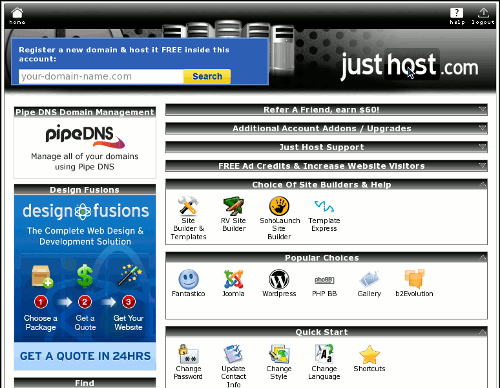
Before applying greasemonkey script
After:
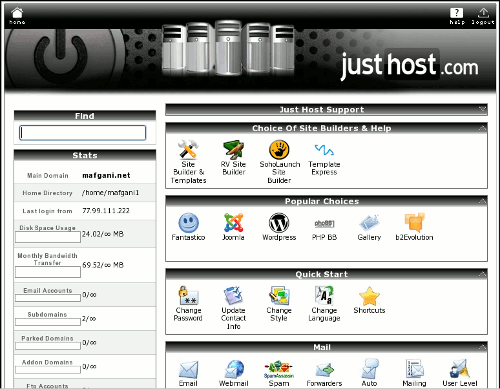
After applying greasemonkey script
Moving from Blogger to WordPress
by Mostafa on Oct.18, 2009, under How To ...
The initial move is easy enough using the Blogger importer plugin of WordPress. Setting up redirects from the old blog to the new one however takes a bit more work. I followed the instructions at:
http://underscorebleach.net/jotsheet/2006/05/move-blogger-to-wordpress
Links